Repeated webhooks, late payment confirmations and partial refunds can quietly break a homemade checkout. Funnel and Revenue connects that payment history to the access your customer receives, with the checks and recovery paths already built.
Growth
Funnel and Revenue
Turn Stripe checkouts into active customer access, even when webhooks retry.
Stop losing buyers mid-checkout—and stop leaking paid access to lapsed or refunded accounts. Funnel & Revenue connects your signup flow, Stripe Checkout, and app permissions into a single resilient state machine. It recovers interrupted checkouts, provisions access on confirmed payments, and automatically revokes or flags accounts when webhook events and subscription checks detect a lapse, refund, or dispute.
$99 first mod · $75 each additional mod · One-time license
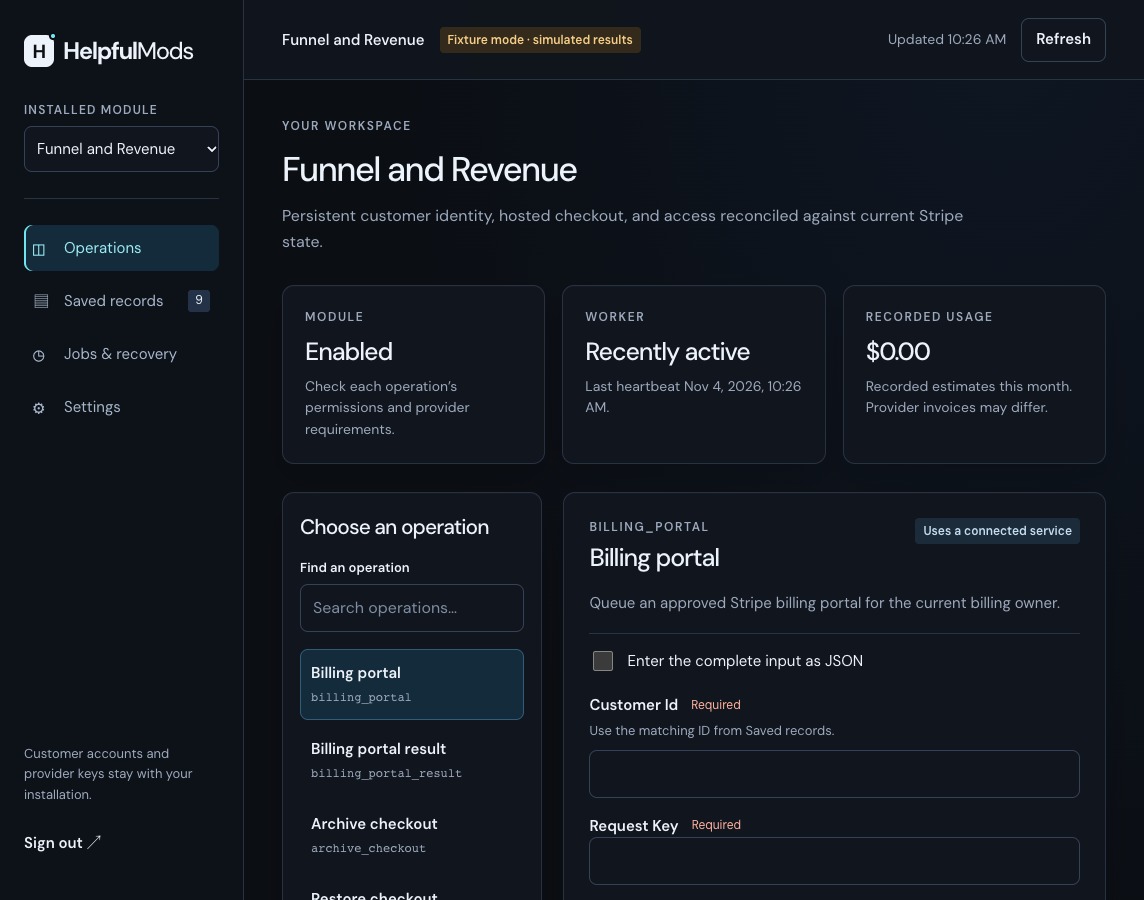
See the included admin workspace
View full-size screenshotThe built-in admin workspace, shown with sample data. Your coding agent adapts the UI to match your app.
Test-drive the live workspace with sample data. Nothing is charged or sent. Your sample workspace lasts up to 15 minutes.
Interactive sandbox ready — select a workflow above to inspect live sample data and state transitions.
Explore the examples with sample data.
Funnel and Revenue
Resumable Checkout & State Sync in Action.
Step through the customer state machine from email capture to abandoned-checkout recovery, verified Stripe payment and paid access.
You bring:
- Your landing page and signup form
- Your emails
- Your product
- Your app's design
The mod handles:
- The customer record
- The link that brings them back
- Checkout
- Confirming payment with Stripe
- Whether they have access
Funnel & Revenue · Edge-case handling
They paid. Does your app know?
Out-of-order webhooks, partial refunds, and disputes are where homemade Stripe integrations break. Click a scenario to walk through the mod’s response.
The success page isn't proof. Access comes from what Stripe confirms.
WHY WE BUILT THIS (SO YOU DON’T HAVE TO)
The Stripe edge cases that break homemade checkouts, already handled.
What the package handles
What you can build with it
- Keep a customer's details and progress so they can return to the same checkout.
- Sell one-time purchases and flat-rate recurring subscriptions through Stripe Checkout.
- Automatically revoke access when subscription checks confirm a lapse, and pause access for review after partial refunds, disputes, or fraud warnings.
Included capabilities
- Supports one-time purchases and flat-rate recurring subscriptions via Stripe Checkout.
- Verifies Stripe webhook signatures and double-checks current Stripe state before granting or revoking user access.
- Keeps one record per customer email, with secure return links that bring drop-offs back to the purchase they left.
- A customer billing portal connected to your configured Stripe settings.
- Temporary Stripe lookup failures can retry within a set limit. Unconfirmed payment changes wait for reconciliation before another attempt, helping protect customers from repeated charges.
Before you choose
Architecture & Runtime Specs
Who it is for
- Founders selling a subscription or digital product.
- Teams fixing a signup-to-checkout flow that drops users between steps.
- SaaS and digital product teams that want user permissions tied directly to confirmed Stripe billing status.
Hosting and connections
V1.1.2
Runs on Node.js 22.13+ and PostgreSQL 17, with a persistent service and background worker for queued work. Deploy on Railway, Render, Fly.io or a VPS configured for those processes.
Self-host on Node.js 22.13+ and PostgreSQL 17 with zero Helpful Mods platform or per-seat fees. Your customer data stays in your database.
Connects directly to your own Stripe accounts with zero middleman fees.
Show the integration
Your app backendFunnel and RevenueStripe
Your app calls the mod on your server. The mod saves its records in your database and uses your own provider accounts for the features you enable.
Install the package, run its migrations, configure the mod and start its HTTP service as described in README.md. Set MOD_ORIGIN to the service’s origin. Keep its operator token, customer signing secret and provider keys in your server environment. Use the configured HTTPS service origin in production.
Connect a signed-in customer
Link a verified customer to their billing record. Your backend verifies the person’s session and workspace membership, then chooses their actorId and tenantId from its own records. The helper signs a 60-second token limited to this mod and the customer role.
Customer request example
Save this helper beside the installed package’s package.json. Call customerRequest from your authenticated backend with that verified customer record. Set HM_AUTH_SECRET to the same private signing secret used by the mod. Do not construct verifiedCustomer from the browser’s request body.
Use the verified account email. This creates or finds its billing record without opting the person into email. Save the returned customerId against that account in your backend.
import { signToken } from './dist/core/auth.js';

export async function customerRequest(verifiedCustomer) {
  const token = signToken({
    aud: 'helpfulmods', sub: verifiedCustomer.actorId,
    tenant: verifiedCustomer.tenantId, role: 'customer', mods: ['funnel'],
    exp: Math.floor(Date.now() / 1000) + 60, external: false,
  }, process.env.HM_AUTH_SECRET);
  const response = await fetch(new URL('/api/funnel/commands/capture', process.env.MOD_ORIGIN), {
    method: 'POST', redirect: 'error', credentials: 'omit',
    signal: AbortSignal.timeout(10000),
    headers: { Authorization: 'Bearer ' + token, 'Content-Type': 'application/json' },
    body: JSON.stringify({ email: verifiedCustomer.email, consent: false }),
  });
  if (!response.ok) throw new Error('Customer request failed: ' + response.status);
  const result = await response.json();
  return { customerId: result.customerId };
}
Check the service from your private admin backend
Read the saved customers, checkout activity and worker status. This uses the installation’s operator credential for a private administration check. Your backend checks staff permissions before making this request.
Administration request example
Save this as integration-example.mjs and run node --env-file=.env integration-example.mjs. Set HM_API_TOKEN to the private operator token used by the service. These requests do not send email, take payment or call an AI model.
const origin = process.env.MOD_ORIGIN;
const token = process.env.HM_API_TOKEN;
if (!origin || !token) throw new Error('Set MOD_ORIGIN and HM_API_TOKEN');
const response = await fetch(new URL('/api/funnel/state', origin), {
  method: 'GET', redirect: 'error', credentials: 'omit',
  signal: AbortSignal.timeout(10000),
  headers: { Authorization: 'Bearer ' + token },
});
if (!response.ok) throw new Error('Mod request failed: ' + response.status);
console.log(await response.json());
A useful handoff to your coding agent
How setup works
Point your coding agent at README.md and setup/SKILL.md. The zip includes architecture docs, an integration guide, an error reference, and automated checks so your agent can work directly from the source package. Live provider setup connects to your own accounts.
- Architecture scan. Your coding agent inspects your codebase, routes, database and authentication, then plans how to connect the mod.
- Answer a few quick questions. Your agent asks how you want the feature configured and connects your API keys in your private environment.
- Run the tests and go live. Your agent runs the included verification suite, checks the customer workflow and tests your connected services before launch.
What your agent will ask you during setup
- Which Stripe prices, amounts, currencies, and one-time or subscription offers will you sell?
- Where should customers land after paying, and how long should their checkout-recovery links stay valid?
- How does your main app sign users in and pass their user ID to the checkout service?
What your agent checks
- Bring the same customer back to checkout without duplicating their account.
- Run a test checkout and confirm user access turns on only after Stripe confirms payment.
- Test duplicate events, failed payments, cancellations, and refunds, and confirm that one customer cannot read another customer's access.
Focused Scope & Extensibility
Included scope, capacity and customization
- Fixed-price purchases and flat-rate subscriptions use the prices you configure. Issue refunds through your Stripe tools; custom tax calculation, promo logic and metered billing can be added to the supplied source.
- Recovery links return customers to the checkout they left. Your main app continues to handle sign-in.
- Partial refunds, disputes and fraud alerts pause access for staff review. Keep up to 100 unarchived checkouts and 100 unarchived payment-risk records per customer, then archive settled records while preserving access and history.
Before you decide
Will this work with my existing app?
Yes. Each mod runs as a service alongside your existing app, whether you use Next.js, Rails, Django, Laravel, Go, Express, or another backend stack. Your backend makes HTTP requests and passes verified customer identities; your coding agent wires up the connection. This mod runs on Node.js 22.13+ and PostgreSQL 17 on a host that supports a persistent Node.js process.
What will my agent need from me?
Access to your codebase, your answers to the setup questions above, and API keys for any connected services. Store keys in your own private .env environment or secret manager.
What happens if setup fails?
The included setup/error-reference.json gives your coding agent error explanations and recovery steps. Every purchase includes 30 days of direct setup support and 12 months of bug and security updates. If a material defect cannot be fixed, our refund policy provides a full refund.
Is this a subscription?
No. You pay once ($99 for your first mod, $75 for each additional mod) and can use and modify the source code in your product forever. Includes 12 months of bug and security updates, with zero recurring Helpful Mods fees.
How do I buy this mod?
Add this mod to your cart and pay through Stripe Checkout. Instant delivery: Download your complete source zip, SQL migrations, and agent setup prompts the second Stripe confirms checkout.
Can customers manage their billing?
Customers can open your configured Stripe billing portal from your app. You choose the billing changes permitted during setup, and the mod checks Stripe before updating customer access.