- Custom voice profiles, audience rules, publishing cadences, and monthly OpenAI spend caps.
- Automated repetition checks against your past archive, with saved generation jobs and recovery after interruptions.
- A review workspace with revisions, approval, archived issues, and downloadable exports.
- An HTTP API, command-line tools, a local MCP server, and setup prompts for your coding agent.
- Send approved issues through Resend or to your backend webhook.
- Plans each new issue against your past archive and writes in the voice of your samples, with an optional editor-guided revision.
Content
Recurring Writing
AI newsletter and article drafting in your voice, with archive checks for repetition.
Turn rough notes into a newsletter worth sending. Recurring Writing drafts scheduled issues and articles from your source material and voice samples, checks your archive for repeated passages and overlapping topics, and puts each draft in your review workspace before publication.
$99 first mod · $75 each additional mod · One-time license
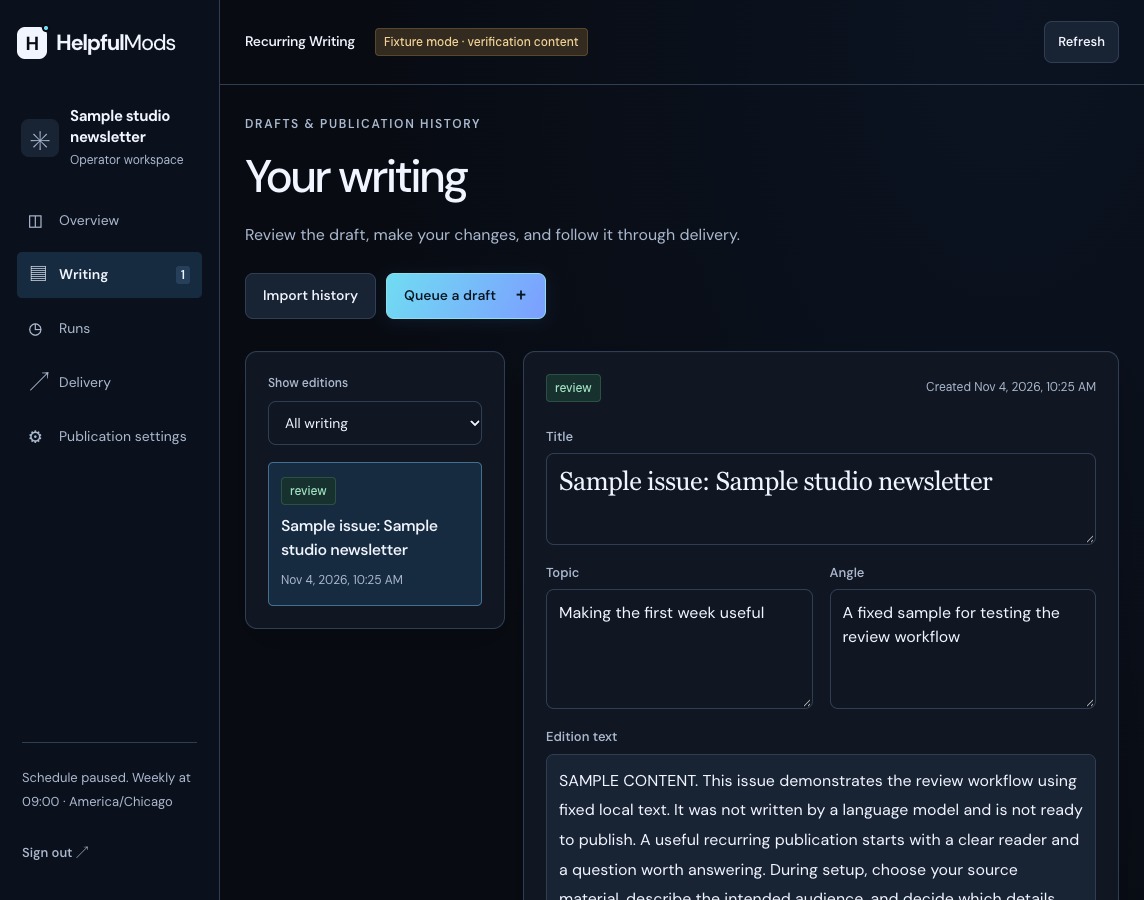
See the included writing workspace
View full-size screenshotThe built-in writing workspace, shown with sample data.
Test-drive the live workspace with sample data. Nothing is charged or sent. Your sample workspace lasts up to 15 minutes.
Interactive sandbox ready — select a workflow above to inspect live sample data and state transitions.
Explore the examples with sample data.
Recurring Writing · Studio Notes
Archive-Checked Drafting in Action.
Inspect how Recurring Writing turns raw notes into a Friday issue, flags repeated archive passages before publication, and holds the draft for editorial sign-off. Select an issue to read it.
01 ·
Notes and past issues
Each draft starts from Ana's notes and is checked against everything already published.
02 ·
A draft on schedule
A new draft arrives for each Friday's issue. It is checked against past issues, and detected repeats are held for review.
03 ·
Approved and saved
Every approved issue is saved to the archive.
What the package handles
What you can build with it
Before you choose
Architecture & Runtime Specs
Who it is for
- Businesses preparing a newsletter, briefing, or topical article series.
- Founders and editors who want AI-assisted drafts held in a clean review queue before anything goes out.
- Teams adding a writing service to the app they already have.
Hosting and connections
V1.1.2
Runs on Node.js 22.13+ and PostgreSQL 17, with a persistent service and background worker for queued work. Deploy on Railway, Render, Fly.io or a VPS configured for those processes.
Self-host on Node.js 22.13+ and PostgreSQL 17 with zero Helpful Mods platform or per-seat fees. Your customer data stays in your database.
Connects directly to your own OpenAI and Resend accounts with zero middleman fees.
Show the integration
Your app backendRecurring WritingOpenAI / Resend
Your app calls the mod on your server. The mod saves its records in your database and uses your own provider accounts for the features you enable.
Install the package, migrate and configure a publication, then start the Writing HTTP service. Set MOD_ORIGIN to its origin and RW_API_TOKEN to its private operator token. Your app checks staff access before making this request. Use the configured HTTPS service origin in production.
Check the service from your private admin backend
Read the publication, job queue and recent writing activity. This uses the installation’s operator credential for a private administration check. Your backend checks staff permissions before making this request.
Administration request example
Save this as integration-example.mjs and run node --env-file=.env integration-example.mjs. These requests do not send email, take payment or call an AI model.
const origin = process.env.MOD_ORIGIN;
const token = process.env.RW_API_TOKEN;
if (!origin || !token) throw new Error('Set MOD_ORIGIN and RW_API_TOKEN');
const response = await fetch(new URL('/api/state', origin), {
  method: 'GET', redirect: 'error', credentials: 'omit',
  signal: AbortSignal.timeout(10000),
  headers: { Authorization: 'Bearer ' + token },
});
if (!response.ok) throw new Error('Mod request failed: ' + response.status);
console.log(await response.json());
A useful handoff to your coding agent
How setup works
Point your coding agent at README.md and setup/SKILL.md. The zip includes architecture docs, an integration guide, an error reference, and automated checks so your agent can work directly from the source package. Live provider setup connects to your own accounts.
- Architecture scan. Your coding agent inspects your codebase, routes, database and authentication, then plans how to connect the mod.
- Answer a few quick questions. Your agent asks how you want the feature configured and connects your API keys in your private environment.
- Run the tests and go live. Your agent runs the included verification suite, checks the customer workflow and tests your connected services before launch.
What your agent will ask you during setup
- What will this publication cover, who reads it, and what should it help them do?
- Which source text, prior issues, and writing examples can you provide?
- What voice, timezone, schedule, length, and budget should it use?
- Who reviews each issue, and should approved work stay in the archive, go to Resend, or reach your backend webhook?
- Where will the writing service run, and how should it connect to your existing app?
What your agent checks
- Verify settings, database connection, and the background worker.
- Run a complete sample draft locally without spending OpenAI tokens or sending live emails.
- Review, edit, approve, archive, and export a saved issue.
- Check that repeated material is flagged, interrupted jobs remain recoverable, and repeated requests do not create duplicate work.
- Test live OpenAI generation and Resend or webhook delivery before enabling your schedule.
Focused Scope & Extensibility
Included scope, capacity and customization
- Your supplied notes and documents provide the source material. Attached URLs remain citations rather than instructions to fetch a web page.
- Archive checks flag repeated passages and overlapping topics for your editorial review; you approve each issue before it is published.
- One publication and editor per installation keeps its voice profile and archive together. Send approved issues through Resend or your backend webhook, and keep subscriber-list management in your email platform.
Before you decide
Will this work with my existing app?
Yes. Each mod runs as a service alongside your existing app, whether you use Next.js, Rails, Django, Laravel, Go, Express, or another backend stack. Your backend makes HTTP requests and passes verified customer identities; your coding agent wires up the connection. This mod runs on Node.js 22.13+ and PostgreSQL 17 on a host that supports a persistent Node.js process.
What will my agent need from me?
Access to your codebase, your answers to the setup questions above, and API keys for any connected services. Store keys in your own private .env environment or secret manager.
What happens if setup fails?
The included setup/error-reference.json gives your coding agent error explanations and recovery steps. Every purchase includes 30 days of direct setup support and 12 months of bug and security updates. If a material defect cannot be fixed, our refund policy provides a full refund.
Is this a subscription?
No. You pay once ($99 for your first mod, $75 for each additional mod) and can use and modify the source code in your product forever. Includes 12 months of bug and security updates, with zero recurring Helpful Mods fees.
How do I buy this mod?
Add this mod to your cart and pay through Stripe Checkout. Instant delivery: Download your complete source zip, SQL migrations, and agent setup prompts the second Stripe confirms checkout.