SaaS architecture and source code
Best Modular SaaS Boilerplates and Starter Kits
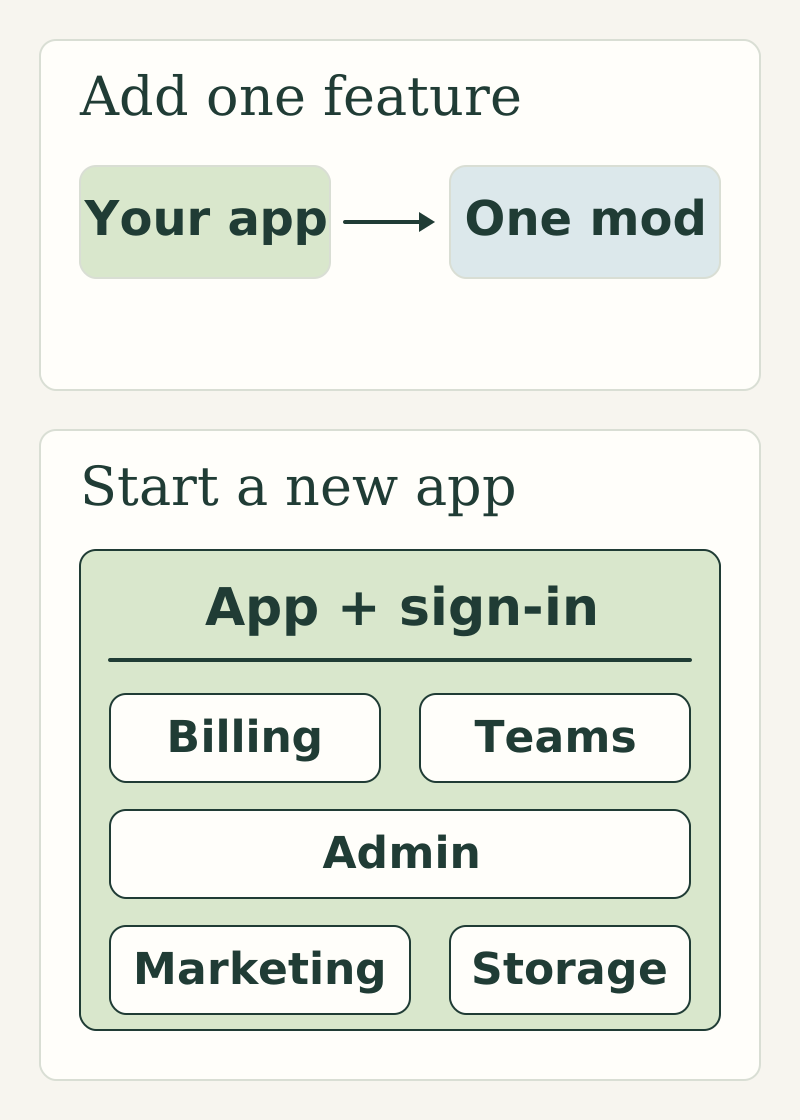
If your app already works and you need to add payments, booking, team access or customer support, Helpful Mods is our first choice for a standalone feature you can own and run yourself. You keep the application you've built and connect the service you need.
If you're starting a new product, a complete SaaS starter can be a better purchase. MakerKit, supastarter, ShipFast, TurboStarter and Open SaaS each give you a different starting architecture. The right choice depends on how much of your application you want the purchase to supply.
We make Helpful Mods. This is our selection, organized around the kind of application you're building and the work you want the purchase to supply. Product details were checked against the linked official sources on November 3, 2026.
The choices at a glance
| Tool | What you get | Our recommended fit |
|---|---|---|
| Helpful Mods | Individual TypeScript and Node.js feature services, with source, tests and integration guides | Adding a specific capability to an existing app |
| MakerKit | An application starter with account models, billing, administration and agent guidance | A new B2B SaaS that needs a coherent account and permissions model |
| supastarter | A full application starter with organizations and configurable integrations | A new SaaS whose team wants a choice of payment providers |
| ShipFast | A Next.js starter covering familiar launch essentials | A focused new Next.js product with login, payments and a marketing site |
| TurboStarter | Connected web, mobile and browser-extension starters | A product that needs more than a website |
| Open SaaS | A free, open-source React and Node.js starter built on Wasp | A new product whose team welcomes Wasp's framework conventions |
The table includes both standalone services and complete starters. A feature package inside a starter can be modular while still depending on that starter's application structure. A standalone service makes a different promise: it has a defined connection to the app you already operate.
What we looked for
Our main criterion is the work the product is supposed to replace. Adding a booking service and choosing the architecture for a new company are different buying decisions.
We also considered how the code connects to an existing app, which infrastructure you operate, what the license covers, and whether the documentation makes those responsibilities understandable. Feature counts alone don't answer those questions. An extensive feature list is useful when you'll use the surrounding application; it can be less relevant when you've already built that application.
1. Helpful Mods: add a feature to the app you already have
Helpful Mods supplies 25 individual SaaS features as full, modifiable source code. Each download includes implementation code, tests, setup instructions and guidance for coding agents such as Cursor, Claude Code and Codex. You choose the feature and connect it to your own application. Browse the mod library.
For example, Funnel and Revenue connects Stripe Checkout to customer access, including the payment events that can change that access later. Booking & Calendar adds appointment holds, fixed-amount deposits, timezone handling and calendar updates. Paid Membership and Teams covers per-seat subscriptions, invitations and team roles.
The integration guides tell your developer or agent where the service connects to your backend. Your application continues to handle its existing login and customer identity. Most mods use Node.js and PostgreSQL; Website Chat uses its own Node.js and SQLite runtime. Your chosen mod's requirements matter more than the framework used for your frontend.
Single mods cost $99. The additional-mod price is $75 under the published purchase policy. Each license covers one commercial product; hosting and provider charges remain separate. The purchase includes 30 days of initial setup help and at least 12 months of bug and security fixes for the purchased version. You can keep using the source versions you receive indefinitely under the license. Read the source license.
Choose Helpful Mods when the feature is the part you want to buy.
2. MakerKit: establish the account model for a new B2B app
MakerKit is a strong choice when you're selecting a whole application architecture. Its documented starter includes personal and team accounts, invitations, roles, billing and administration. The Supabase kits use database Row Level Security; its Better Auth kits use organization-scoped authorization policies. It also supplies coding-agent guidance and an MCP server. See MakerKit's architecture and features.
That is valuable when teams and account boundaries need to be consistent throughout a new product. Starting with those conventions can be preferable to assembling an account model from unrelated examples.
MakerKit's pricing page describes a one-time license with lifetime updates and unlimited projects, with different developer-access allowances for Pro and Teams. Those terms differ materially from Helpful Mods' one-product license, so compare the license as well as the checkout price. Check MakerKit's current plans.
For an existing app, first decide whether you want to adopt its surrounding structure. For a new B2B SaaS, that structure may be the main reason to choose it.
3. supastarter: a complete starter with provider choices
supastarter is another substantial option for a new application. Its Next.js documentation covers authentication, organizations, payments, email, storage and other application services. The organizations documentation describes members, roles and permissions, with organization data held in your database through Better Auth. Read the introduction and organization model.
Its documented payment options include several providers. That makes it worth considering when a new product needs a complete starter and your choice of payment provider is still open. Review the documentation for the specific framework and provider combination you'll use.
We would shortlist it alongside MakerKit for a new SaaS, then compare the actual account model, billing requirements and deployment approach. Its broader application is less compelling as a purchase if the only missing part of your existing app is one feature. Check the current offer.
4. ShipFast: familiar essentials for a focused Next.js product
ShipFast concentrates on a recognizable new-product setup: a Next.js codebase with login, payments, email, database integrations, styling, and SEO and blog foundations. Its public offer lists MongoDB or Supabase and Stripe or Lemon Squeezy among those choices. See ShipFast's included features and pricing.
That is a sensible shortlist for someone who wants those essentials together and has already chosen Next.js. Evaluate any more specialized requirements against the current documentation before purchasing. A team permission model, unusual billing arrangement or scheduling workflow deserves its own check; a general starter's payment integration doesn't establish how every business-specific case is handled.
The useful comparison here is how much of ShipFast's starting application you want to use. A buyer starting fresh may want most of it. An established app may only need a smaller service.
5. TurboStarter: connect web, mobile and an extension
TurboStarter's distinctive offering is the range of application surfaces. Its web documentation describes a Next.js frontend and backend services shared with mobile and browser-extension applications. It also documents authentication, organizations and several billing models. Read the web kit overview.
That makes it a particularly useful option when your roadmap includes a native mobile app or a browser extension alongside the website. A shared starting architecture can matter more than having the smallest initial codebase.
If you only need to add appointment booking to one existing website, those additional applications may not affect your decision. If the product itself spans those surfaces, put TurboStarter near the top of your shortlist. Check its current kits and licenses.
6. Open SaaS: a free starter for a team comfortable with Wasp
Open SaaS is a free, open-source React and Node.js starter powered by Wasp. Its public feature list includes authentication, payment integrations, email, file-upload examples, an admin dashboard and end-to-end testing. Explore Open SaaS.
It is a good option when you want a complete starting application and are happy to build within Wasp's conventions. The framework decision matters: Open SaaS isn't a Next.js starter or an individual backend feature to attach to any app unchanged.
A free source license can make the starting point attractive. Your team still takes responsibility for understanding the framework, configuring providers, deploying the product and maintaining the result.
Make the decision with one real workflow
Pick a customer journey that matters to your product. For billing, follow a customer from checkout through a failed payment or refund. For booking, follow a reservation while another customer tries to select the same time. For team access, follow an invitation through acceptance, permission changes and removal.
Then ask which purchase gives you the part of that journey you need, and what your app must supply around it. The answer will often narrow the shortlist more effectively than another page of feature checkmarks.
For an existing app, start with the Helpful Mods library and the integration guide for the feature you want. For a new application, compare the starters above against the account model, framework and platforms you actually intend to use.