Payments & access
A customer closed Stripe Checkout. What should your app do next?
A customer clicks Buy, opens Stripe Checkout and closes the tab. Later, they return to your app and click Buy again. Your backend needs to decide whether to reopen the original checkout, wait for its payment or create a replacement.
That decision gets harder if every click creates a new order and every return URL changes the payment state. Start by keeping one saved purchase attempt that your app can inspect again.
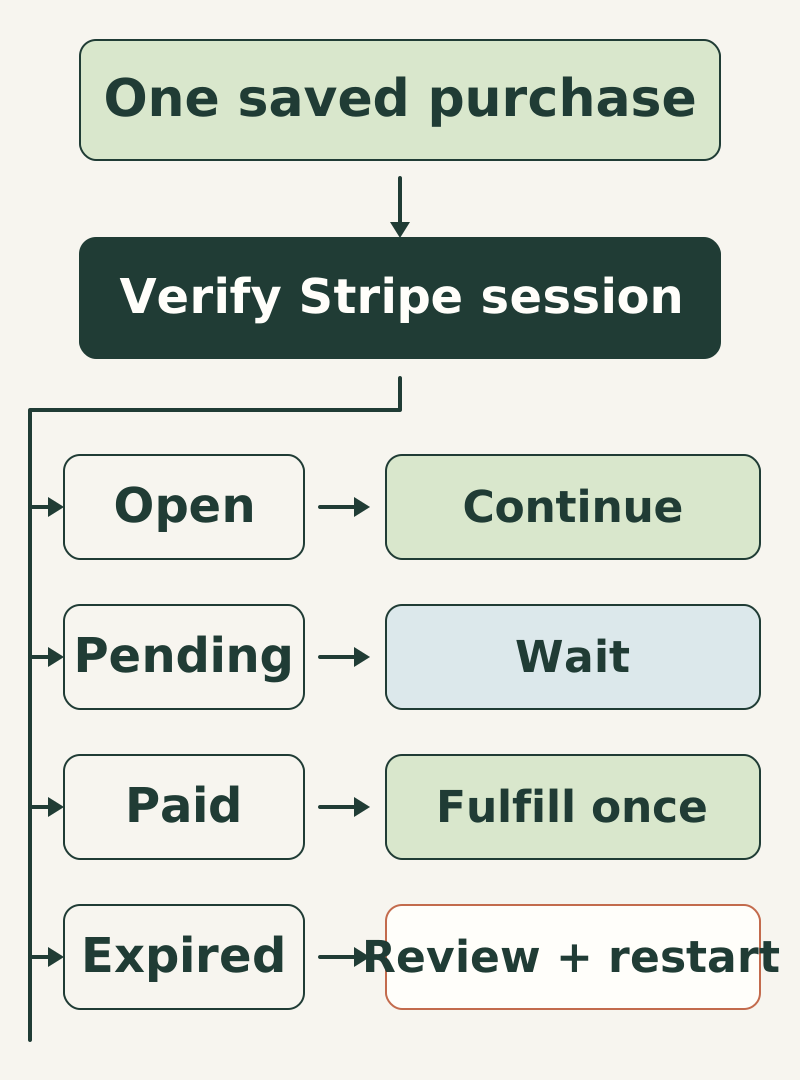
Keep the original Checkout Session attached to the attempt
Before making a provider request, save the customer, intended purchase, amount, currency and a stable request key. Once Stripe returns a Checkout Session, save its ID against that attempt. If the response is lost, recover the original provider request with its original idempotency key rather than creating an unrelated attempt.
Your return page can ask the backend for an update. It cannot decide that payment succeeded or failed. Stripe points out that a successful customer may never reach the landing page, so fulfillment also needs a server-side event path. Stripe’s fulfillment guide explains that requirement.
Retrieve the saved session from your server
First authenticate the person in your app and check that the purchase attempt belongs to them. Load the session ID from that attempt. Don’t retrieve an arbitrary session ID supplied by the browser and reveal its details.
Use your server’s Stripe credentials to retrieve that Checkout Session. Match the returned account, payment mode, session, customer or order reference, currency and expected amount before changing local state. The following table is for a one-time purchase that requires payment:
| Verified provider state | What your app should do |
|---|---|
| Session open, payment unpaid | Offer the original saved Checkout URL again. |
| Session complete, payment paid | Fulfill through the same idempotent server function used by the webhook worker. |
| Session complete, payment unpaid | Keep the purchase pending while the payment method finishes; show a clear pending state. |
| Session expired, payment unpaid | Mark this attempt expired. Recheck price, inventory and customer authorization before creating a replacement. |
| Missing object, conflicting fields or uncertain provider response | Keep access unchanged and reconcile the original attempt. |
A free order, subscription or payment method setup has different completion rules. Give it a separate decision path instead of stretching the one-time paid-purchase rule to cover it.
Make the next click recover the attempt
For a local example, a decision function can accept only a saved attempt and a provider result that your backend has already verified:
export function nextCheckoutAction(attempt, verifiedSession) {
  if (verifiedSession.id !== attempt.sessionId ||
      verifiedSession.currency !== attempt.currency ||
      verifiedSession.amount_total !== attempt.amount) {
    return 'reconcile';
  }
  if (verifiedSession.status === 'complete') {
    return verifiedSession.payment_status === 'paid'
      ? 'fulfill-once' : 'wait';
  }
  if (verifiedSession.status === 'open' &&
      verifiedSession.payment_status === 'unpaid') return 'reuse';
  if (verifiedSession.status === 'expired' &&
      verifiedSession.payment_status === 'unpaid') return 'replace';
  return 'reconcile';
}
This function chooses the next action; it does not verify a Stripe response, authorize a customer or create a payment. Keep those checks in the server adapter that calls it. When the result is replace, close the local attempt only after the original provider session is definitively expired. Create the replacement through a new authorized purchase request with its own stable key.
Give the customer a useful recovery screen
Show “Continue checkout” when the saved session remains open. Show “Payment pending” while a delayed payment is unresolved, with a way to refresh its status. After expiry, explain that the checkout ended and let the customer review the current purchase before starting again. Preserve their selection when you can, but refresh anything that may have changed, such as inventory or price.
Test closing the tab without following the cancel URL, returning after payment, repeating a request whose response was lost and receiving an expiry event after the app has already seen a later result. None of those tests should grant duplicate access or silently create a second charge attempt.
Funnel and Revenue connects customer records to saved checkout attempts and reconciliation commands. It is useful when your app needs that recovery work alongside the rest of its purchase flow. The customer’s return page can then show the saved result instead of guessing from the URL.